
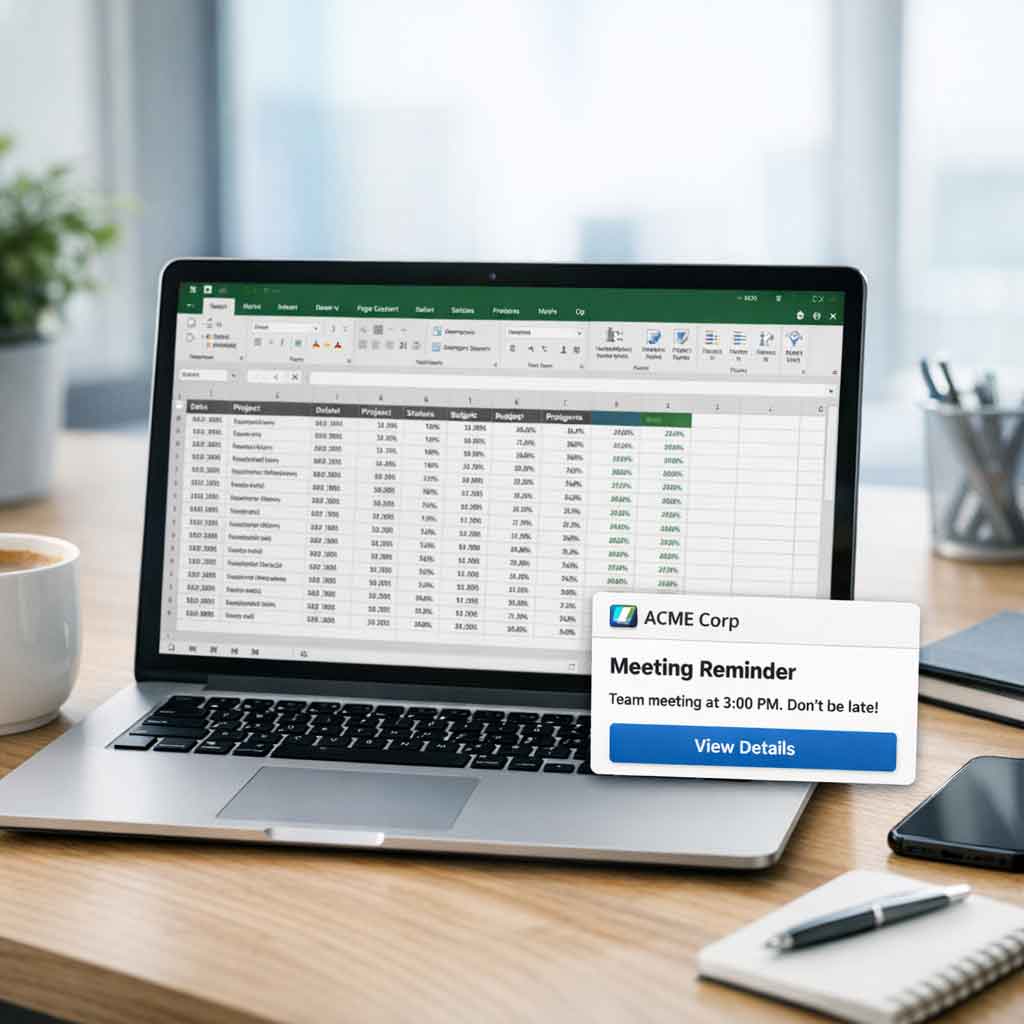
How many unread emails are in your inbox right now? How many chat notifications have you dismissed in the last hour? In any large organization, communication channels are overflowing. The constant stream of information makes it incredibly difficult for critical messages to stand out. When everything is marked “urgent,” nothing truly is. This information fatigue leads to missed updates, delayed actions, and a disconnected workforce.
If you’re an internal communications professional, IT manager, or anyone responsible for employee engagement, you know the struggle of getting important messages noticed. This article will cover what toast notifications are, their benefits, best practices for implementation, and key use cases. We’ll also clarify when toast notifications are appropriate—and when they’re not—so you can use them effectively in your digital workplace.
Toast notifications matter because they offer a way to deliver brief, timely alerts that cut through digital noise without disrupting workflow. In the context of internal communications and today’s digital workplace challenges, they provide a lightweight, unobtrusive channel for quick feedback and updates—helping ensure your messages are seen without overwhelming your team.
The Struggle for Attention in the Modern Workplace
Getting a message seen and acted upon has become a significant operational hurdle. Companies are competing for their own employees’ attention against an endless flood of digital noise. Several factors contribute to this challenge.
Relying on a single channel, like email or an intranet portal, means that a significant portion of your workforce may not receive time-sensitive information when they need it. Not all channels are suitable for delivering urgent or critical updates, which highlights the need for a more effective solution.
The Deluge of Digital Communication
Employees start their day with an inbox full of emails, a backlog of team chat messages, and updates on various project management platforms. The average professional receives more than 120 emails per day, and that number is only growing. This sheer volume forces people to skim, prioritize, and inevitably, ignore messages.
Important announcements about policy changes or security updates can easily be lost in the shuffle. To address this, it’s crucial to limit the number and content of toast notifications so that only the most relevant and concise information is delivered, ensuring important messages stand out and are not lost in the noise.
Banner Blindness and Notification Fatigue
Just as internet users have learned to subconsciously ignore banner ads online, employees have developed “notification blindness.” The constant pinging and popping of alerts from different applications desensitizes them to new information. They begin to tune out notifications, assuming they are just more of the same.
Too many toasts can overwhelm users and contribute to notification fatigue, reducing the effectiveness of critical alerts. This makes it nearly impossible for genuinely urgent messages to break through the noise using standard channels.
The Challenge of a Dispersed Workforce
Reaching every employee is more complex than ever. Teams are often spread across different time zones, office locations, and remote work setups. A non-desk worker on a factory floor has a different information intake than a marketing manager working from home. Mobile devices present unique challenges for notification delivery, as toast messages can be easily missed on smaller screens.
Relying on a single channel, like email or an intranet portal, means that a significant portion of your workforce may not receive time-sensitive information when they need it.
To address these challenges, organizations are turning to more direct communication tools like toast notifications.
What Are Toast Notifications?
Toast notifications are brief alerts that inform users about system events without interrupting their task flows. They provide quick feedback on actions or outcomes without disrupting the user’s workflow. Essential for app-user communication, toast notifications confirm successful tasks or alert users about potential problems, all while remaining unobtrusive.
Typically, a toast notification appears as a small popup on the screen for a few seconds and then disappears automatically. They are designed to be transient, delivering information quickly and efficiently, so users can stay focused on their current tasks.
Appropriate and Inappropriate Uses of Toast Notifications
While toast notifications are valuable for providing quick feedback and brief alerts, it’s important to use them correctly:
Appropriate Uses:
- Transient, low-priority statuses (e.g., confirming a file upload, saving changes, or alerting about a minor issue)
- Informing users about system events that do not require immediate action
- Providing quick feedback on actions or outcomes without interrupting workflow
Inappropriate Uses:
- Critical information that requires a user response
- Errors or actions that require immediate user attention (use banners or modal dialogs instead)
- Long or complex information
- Immediate interaction required
- Repeated or frequent notifications
- Persistent information that should remain visible until dismissed
Toasts should only be used for brief, non-intrusive updates. For critical actions, errors, or information requiring user input, more prominent UI elements like banners or modals are recommended.
Toast Notifications: A Direct Pop Up Notification Line to Your Team
What if you could bypass the noise entirely? Imagine a tool that allows you to deliver a high-priority message directly to every employee’s screen, in a way that is impossible to ignore. That is the function of a toast notification.
A toast popup, also known as a small popup or pop up notification, is a lightweight notification that briefly appears on the screen to inform users of important events or updates within an app or on a specific page. These notifications are designed to inform users quickly and efficiently, without requiring immediate action or disrupting their workflow.
While some toast notifications are full-screen, others are designed as small popups that remain unobtrusive and disappear automatically after a set duration. They are designed specifically for high-stakes communication where message delivery is non-negotiable. As a feature of the Connected Company platform, these notifications provide a direct and powerful channel to communicate with your entire organization or specific departments instantly.
Unlike an email that can sit unread or a chat message that gets scrolled past, a toast notification ensures that your message is front and center. The importance of auto dismiss and manual dismissal features cannot be overstated—notifications can disappear after a few seconds or be closed by the user, ensuring flexibility and control.
To create effective toast notifications, follow best practices such as limiting content to two lines, carefully choosing where to place toast notifications within the app or on a page, and ensuring they do not interrupt ongoing user interactions. Good UX design means managing the space occupied by notifications, supporting seamless interactions, and enabling users to respond or navigate to relevant content if needed. The goal is to inform users without overwhelming them—toast notifications should remain suitable for brief, non-intrusive updates that enhance the user experience within an app or on a specific page.
Best Practices for Toast Notifications:
- Limit content to two lines for clarity and brevity
- Place toast notifications in a consistent, unobtrusive area of the screen
- Ensure they do not interrupt ongoing user interactions
- Use for brief, non-intrusive updates only
- Include a manual dismissal ‘x’ button, even if the notification auto-dismisses
- Consider adding simple buttons like ‘View’ or ‘Close’ for relevant actions
By following these best practices, you can ensure toast notifications remain helpful and do not contribute to notification fatigue.
Transitioning from understanding what toast notifications are and how to use them, let’s explore the UI elements that make them effective.
The Role of UI Elements in Toast Notifications
UI elements are at the heart of what makes toast notifications such an effective user interface element for internal communications. When designed thoughtfully, these small popups can notify users and inform them about important events—such as incoming messages, background tasks, or the completion status of a process—without pulling them away from their current activity.
A well-crafted toast notification typically includes concise text, recognizable icons, and sometimes a progress bar or status indicator. These UI elements work together to provide information at a glance, allowing users to quickly understand the nature of the notification and decide if immediate action is required.
Toast notifications can sometimes include simple buttons like “View” or “Close” to allow users to take relevant actions directly from the notification. Importantly, all toast notifications should feature an ‘x’ button for manual dismissal, even if they auto-dismiss after a few seconds. This gives users control over their experience and ensures notifications do not linger unnecessarily.
For example, a toast message might display a checkmark icon and the words “Backup Complete” to signal the successful completion of a background task, or a message preview with a sender’s avatar to alert users to new incoming messages.
The key is to design toast notifications that deliver essential updates while minimizing disruption. By appearing briefly and auto-dismissing after a few seconds, these notifications keep users informed about tasks and status changes without interrupting their workflow. This approach ensures that critical information is delivered efficiently, supporting both productivity and engagement across your organization.
In the context of internal communications, leveraging the right UI elements in toast notifications helps maintain a balance between visibility and subtlety. Whether you’re updating employees on the progress of a company-wide software rollout or notifying a department about a completed task, well-designed toast notifications ensure your messages are seen, understood, and acted upon—without overwhelming your team or cluttering their screens, and can play a vital role in effective internal communication campaigns.
Now that we’ve covered the design and UI considerations, let’s look at the key use cases where toast notifications can add value.
Key Use Cases for Toast Notifications
The power of toast notifications lies in their selective use for truly critical information. They are not meant for routine updates but for situations where speed and certainty of delivery are paramount. Here are some of the most effective use cases. Toast notifications can also be used to confirm successful actions, such as confirming a file upload or a completed transaction, providing users with immediate feedback and reassurance as part of a broader ConnectedCompany communication platform strategy.
Urgent IT and System Alerts
IT departments often need to communicate critical information that affects productivity and security. Waiting for employees to read an email about a system update or security patch can lead to significant problems.
System Outages
- Instantly inform the entire company about an unexpected server outage or network failure. This prevents an onslaught of support tickets and manages employee expectations.
Emergency Maintenance
- Announce immediate, unscheduled system maintenance that may cause disruptions. A message like, “URGENT: All network drives will be unavailable for 30 minutes starting at 2:00 PM for emergency maintenance,” ensures everyone is aware.
Security Threats
- Deploy a full-screen alert to warn employees of an active phishing scam or instruct them to change their passwords immediately due to a potential breach.
Transitioning from IT alerts, let’s see how toast notifications can support emergency and safety communications.
Emergency and Safety Announcements
In a crisis, clear and immediate communication can make all the difference. Toast notifications can serve as a vital part of your emergency response plan, delivering instructions quickly to keep your people safe, aligning with emerging future corporate communication trends that emphasize real-time, visual messaging.
Building Evacuations
- In case of a fire alarm or other immediate threat, a toast notification can instruct employees to evacuate the building and provide directions to assembly points.
Severe Weather Warnings
- For organizations in areas prone to extreme weather, an alert can warn employees of an approaching storm and instruct them to shelter in place or prepare for an early office closure.
Health and Safety Alerts
- Announce an on-site medical emergency or a sudden health hazard, ensuring everyone is aware and can take appropriate precautions.
After emergencies, toast notifications also play a role in company-wide announcements.
Critical Company-Wide Announcements
Some business news is too important to risk being missed. For major organizational changes or time-sensitive directives, toast notifications guarantee the message is received by all, complementing other channels like screensaver-based internal communication to keep employees informed.
Merger or Acquisition News
- When major company news breaks, ensure every employee hears it directly from leadership first, preventing rumors and misinformation.
Immediate Policy Changes
- Announce an urgent change in company policy that requires immediate compliance, such as new security protocols or operational procedures.
Last-Minute All-Hands Meetings
- Call an impromptu, mandatory all-hands meeting to address a critical business development, ensuring maximum attendance.
With these use cases in mind, let’s wrap up with how toast notifications can help you regain control of your critical communications.
Regain Control of Your Critical Communications
In a world saturated with digital distractions, hoping your important messages are seen is not a strategy. You need a reliable method to cut through the noise when it matters most. Toast notifications provide that certainty, giving you a direct and unmissable line to your team for your most critical announcements.
By reserving this channel for truly urgent information, you can re-establish a clear signal amidst the noise and ensure your employees pay attention when it counts. Stop letting your most important messages get lost in the digital flood.
Ready to see how you can capture your team’s attention for critical alerts? Explore how Connected Company can equip your organization with the power of toast notifications and transform your internal communication strategy.